“The scanner works until I walk through that part of the building. Then it hangs.”
It’s a familiar complaint. A handheld pauses between tasks. A voice call breaks up while someone walks. A robot loses connectivity somewhere along its route. By the time someone comes to investigate, everything is working again.
The coverage looks reasonable. The client is connected. The controller shows that it changed access points.
But what happened around that change? What was the client doing before it moved? Did the new connection succeed? Where should you look next?
Answering those questions takes evidence from the actual device while it moves through the environment. Understanding that evidence is one challenge. Collecting it can be another entire project.
Sidos makes the collection much easier, then connects the client’s roaming history to the packets around each event.
Why devices roam differently
We carried an iPhone, a MacBook and a Honeywell handheld along the same route, using a Sidos Wave to track each client.
They moved through the same environment, but they made different roaming choices.
Wi-Fi clients have their own logic for deciding when to leave an access point and which one to join. Hardware, drivers, firmware and activity can all influence the result.
The network can help. Features such as 802.11k provide information about neighboring APs, 802.11v can increase efficiency, and 802.11r can reduce security setup during a transition. The actual client still matters.
In our shared observation window, the iPhone roamed six times and the MacBook four times. At one AP, the MacBook stayed about 21 seconds longer than the iPhone, then chose a different destination.
Those observations show why testing with one laptop cannot tell you how every scanner, phone or robot will behave. More roaming, or less roaming, doesn’t by itself mean a better experience.
A coverage map tells you about the environment. Following the client shows you what that device actually does in it.
Why roaming is difficult to capture
With a manually configured packet-capture setup, collecting useful roaming evidence takes preparation.
First, identify the serving AP and likely candidates. Work out their channels. Position capture radios so they can hear the moving client and the relevant APs. Arrange coverage of both sides of the expected transition.
Then walk the route and try to reproduce the problem.
As the client moves, the useful set of channels changes. The APs you needed to monitor at the start may be different from those that matter further along the route.
| Capture position | Channels to consider |
|---|---|
| Position 1 | 36 · 52 · 100 · 149 |
| Position 2 | 52 · 100 · 116 · 157 |
| Position 3 | 116 · 132 · 157 · 40 |
If the client chooses a destination you aren’t monitoring, the decisive exchange may be missing. It can disappear from your capture while continuing to communicate somewhere else.
An intermittent issue adds another complication: your setup may be ready when the device behaves perfectly, then miss the moment when it doesn’t.
Even after collecting the traffic, there is more work. Find the right client, locate the relevant transition, and isolate enough surrounding traffic to understand the sequence.
A considerable amount of effort goes into getting the evidence ready to analyze.
How Sidos automatically follows your client
The Sidos Roaming micro-app starts with a simple interaction.
Bring Wave close to the device you want to investigate. Its strong nearby signal helps you identify it in the client list. Confirm the client, tap to select it, and start tracking.
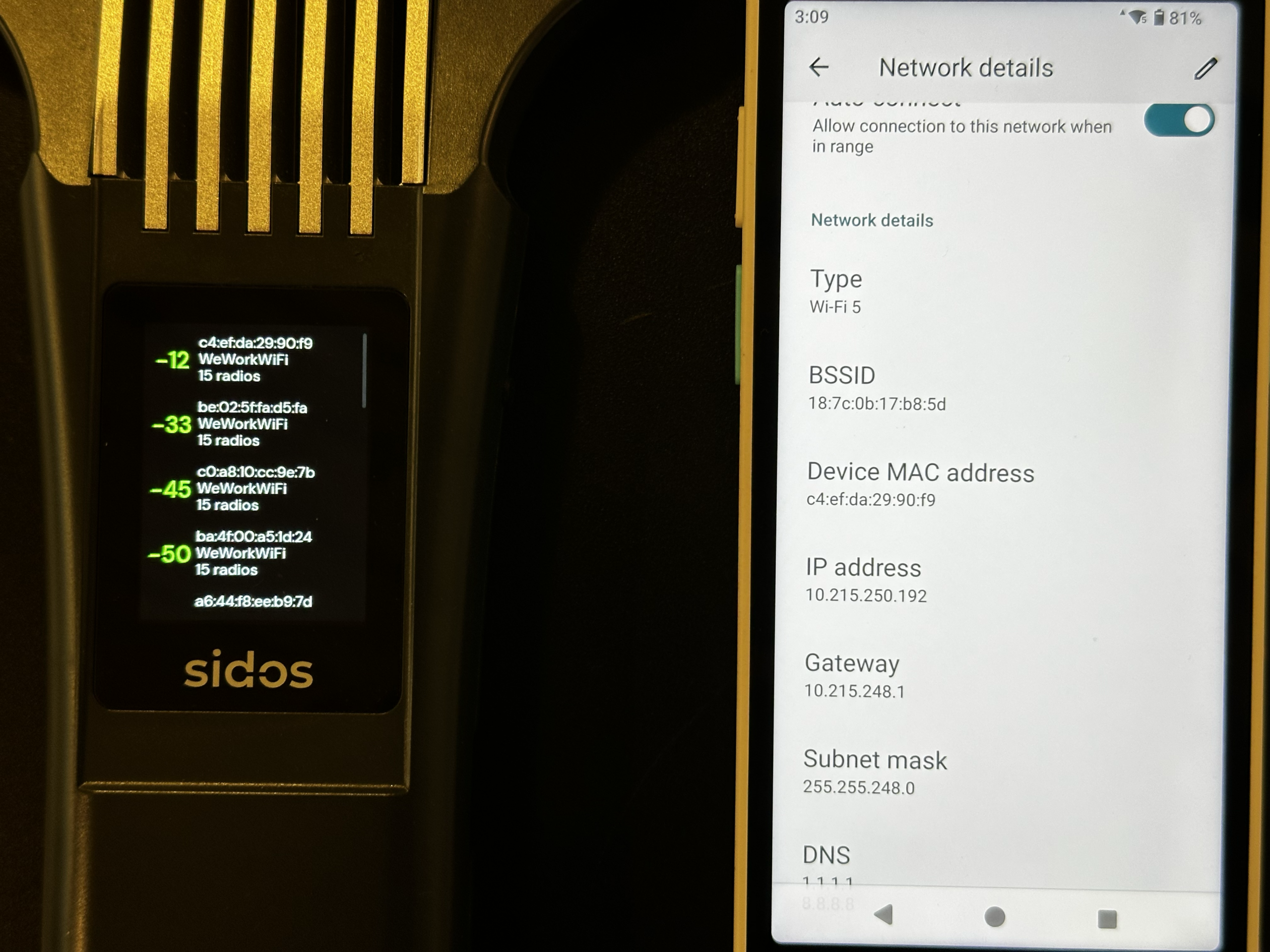
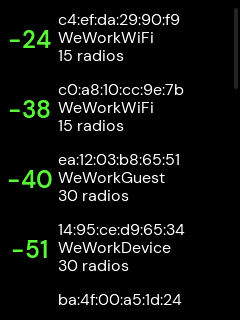
From there, Sidos follows that client as it changes access points. It automatically predicts likely roaming destinations and prepares capture coverage for the APs and channels the client may move to.
The client makes its roaming decisions. Sidos coordinates the work of following those decisions.
That is the capability behind the simple interface. You can start with the device in front of you and gather evidence as it moves, with much less manual planning and adjustment of capture channels.
As tracking continues, Wave builds an association history. Successive AP connections and roaming events appear as they happen.
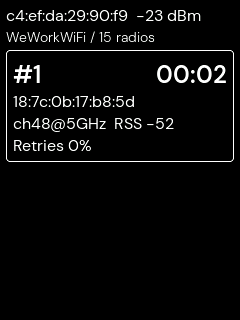
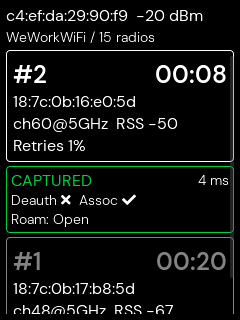
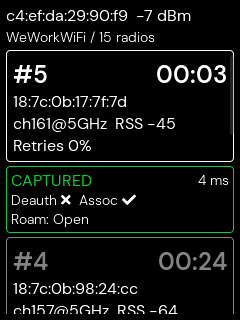
Wave’s display shows you immediately whether a roaming event was captured or only partially captured. If it’s partial, you can repeat the route while you’re still there.
With a conventional capture workflow, you may walk the route, return to your desk, and spend a long time working through the PCAPs before discovering that the exchange you needed is missing. Then you have to go back and start again. Wave puts that feedback in your hand, so you can check the capture and repeat the walk before leaving the test area.
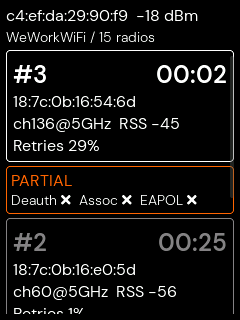
The workflow stays focused on the client you selected, even as its connection changes.
Get the packet capture for a specific event
Collecting data is useful when you can quickly reach the part that matters.
The Sidos timeline shows the broader pattern: which APs the client used, when it moved, and how the observed signal, retries and probing activity changed along the way.
When a transition deserves attention, select that event and pull its packet capture.
The Roaming micro-app automatically trims the capture around the event, keeping the lead-up, transition and following traffic together. You have a focused file ready for frame-level inspection in a tool such as Wireshark.
Select the client. Track its movement. Choose an event. Open the relevant packets.
That connection between the overview and the packet detail makes a practical difference. You can investigate a specific moment without first searching through a much longer recording to build the capture window yourself.
What the scanner capture reveals
Consider a separate Honeywell scanner capture.
At first, the scanner communicates with its old AP. It then repeatedly transmits Wi-Fi housekeeping messages, searches for another connection, associates with a new AP, completes its security exchange, and sends encrypted traffic afterward.
The repeated messages occur before the new connection. Looking only at the final association would miss the behavior that deserves attention.
Opening the packet detail makes the distinction clearer. The repeated frames are marked “No data,” and the retry flag shows retransmission. These messages help manage the Wi-Fi connection; they don’t carry barcode or inventory data.
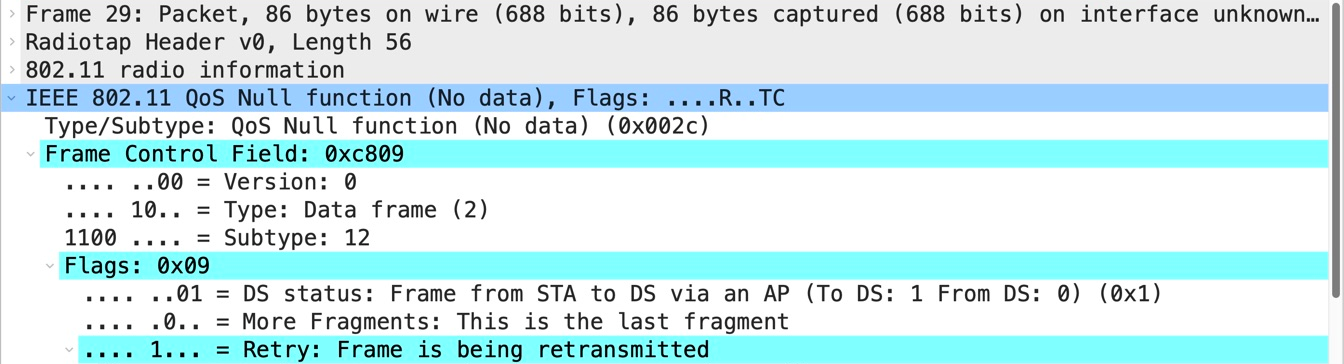
That changes the question. We can investigate why the scanner was repeating those messages before it moved, rather than treating the retry count as a count of failed transactions.
The capture also shows the old AP’s beacons stop appearing while scanner transmissions remain visible on that channel. That gives us specific questions for the network logs: did the AP restart, lose power, stop its radio, or change channel?
The capture alone doesn’t establish the cause or measure an application outage. It gives us a concrete sequence and a useful next step.
This is the value of having the surrounding traffic available. The lead-up, transition and subsequent traffic are already together, so more of the investigation can go into interpreting what happened.
Track handhelds and robots while they work
For a warehouse handheld, a useful test follows the person doing the job. A worker can carry Wave while using the handheld, allowing it to track the selected client along the working route.
For a robot, you can attach Wave directly to it. Wave travels with the robot and tracks its Wi-Fi communication as it moves through the environment.
That makes it practical to gather evidence where the equipment actually operates, including transitions that are difficult to reproduce during a short troubleshooting visit.
During a deployment, you can observe how the intended devices connect and roam along their routes. During troubleshooting, you can collect evidence around intermittent behavior and bring specific events back for closer investigation.
In both cases, the workflow begins with the actual device and follows its activity through to the relevant packet evidence.
Understanding roaming takes careful investigation. Sidos makes the evidence easier to collect and easier to reach, from selecting a nearby client to opening the capture around a particular event.
Have a handheld, phone or robot with an intermittent Wi-Fi problem? Talk to us about seeing Sidos Wave and the Roaming micro-app in action with your use case.